
Switch to another theme
The new UU-Drift theme has a fresh appearance and a clear structure.
Follow the steps below to activate it on your site:
- Open your WordPress-website and log in with your Solis-id.
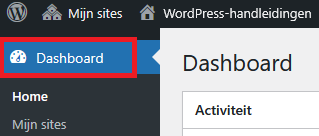
- After logging in you arrive at the back-end of your site, also known as the Dashboard.
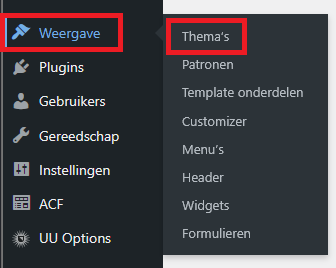
- Click in the left menu on Appearance and then on Themes.
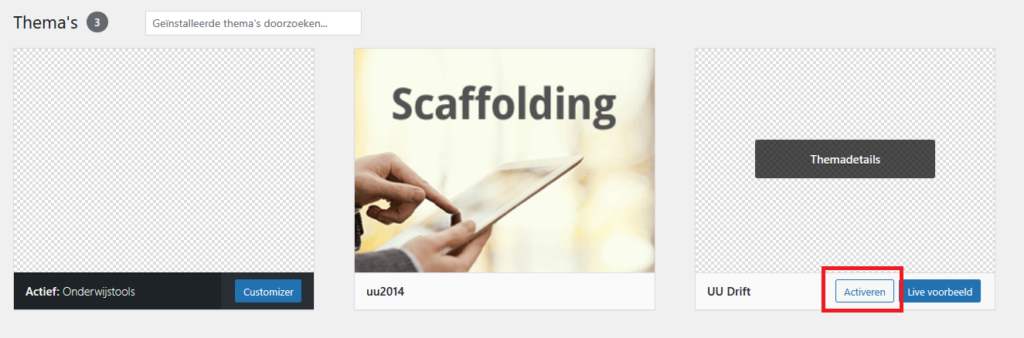
- Find the UU Drift-theme and click Activate.
Check if your website is working accordingly
After theme activation it is important to check if everything is still functioning and looks the same as it used to be. Below we made a list of things you should check:
Look at the website from the front
- Click at the top of the dashboard on your site name and choose Visit site.
- Check if the design is shown as before and no parts are missing.
Check the menu
Check if the main menu is visible and the right pages are in it and work.
Check the widgets (sidebar and footer)
- For example: open the homepage, contact page .
- Check if texts, images, video’s and buttons are still working and/or shown.
Find important pages
- For example: open the homepage, contactpage and a news post.
- Check if texts, images, video’s and buttons are still working and/or shown.
Test forms and functionalities
- Fill in a form to see if you receive a conformation email
- Test archive filters, sliders or other special parts like a searchbar.
Visit important pages
- Check the site on a phone and tablet
- Check if the menu works and the content scales according to the screenwidth.
Contact
If you have any questions or run into a problem, let us know through the contact form.